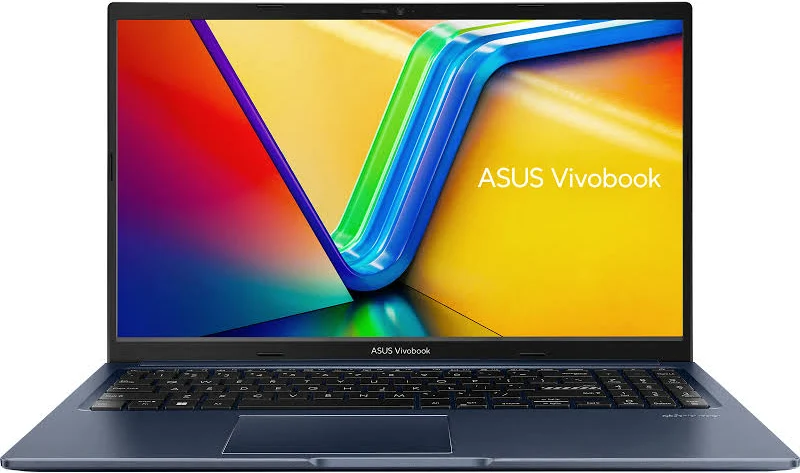
ASUS has officially released its latest mainstream laptop in India. The new ASUS Vivobook 15 Core 5 (2026 Model) was launched on July 4, 2026. This machine represents a major transition in budget-friendly personal computing. Specifically, it is the first laptop in India to showcase the new Intel Core 5 Series 3 processor. With a dedicated AI engine on board, this laptop promises to bring intelligent features to everyday users.
Indeed, the launch marks a shift in how mid-range laptops handle productivity. Mainstream buyers no longer need to pay a heavy premium to experience hardware-accelerated artificial intelligence. Instead, this new ASUS Vivobook 15 Core 5 integrates those capabilities at a much more accessible price point. In this comprehensive review, we will explore its performance, design, battery life, and artificial intelligence capabilities.
So, is the ASUS Vivobook 15 Core 5 the right option for you? Let us dive into the details to find out.
🛒 Check Availability & Deals for ASUS Vivobook 15 Core 5:
💡 Tip: Prices vary daily between platforms. Check both for card offers (up to ₹5,000 off).
ASUS Vivobook 15 Core 5: What is the Intel Core 5 Series 3 Processor?
To understand this laptop, we must first look at its engine. The ASUS Vivobook 15 Core 5 runs on the brand-new Intel Core 5 320 processor. This chip belongs to the “Wildcat Lake” family. Consequently, it represents the third iteration of Intel’s simplified naming system. To clarify, Intel has removed the old “i” prefix (like Core i5) from its modern processors.
Specifically, the Core 5 320 features a unique 6-core architecture. This includes 2 Performance-cores (P-cores) and 4 Low Power Efficient-cores (LP-E cores). Additionally, the processor supports 6 threads of concurrent processing. It comes equipped with 6 MB of Intel Smart Cache to speed up memory access. The P-cores operate at a base frequency of 1.5 GHz, but they can boost up to 4.6 GHz under heavy workloads. In contrast, the efficient cores run at a base frequency of 1.4 GHz to preserve energy.
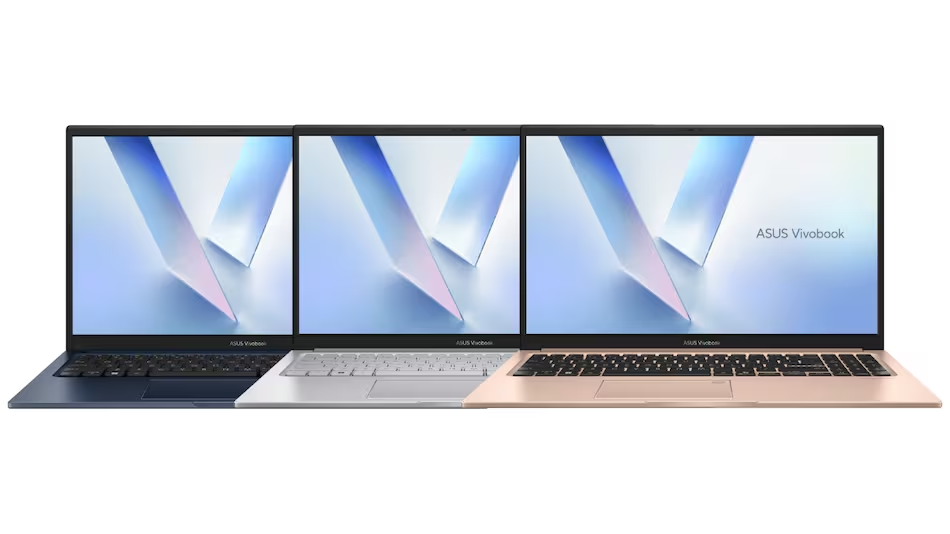
Furthermore, this chip is built using Intel’s advanced 18A lithography. This manufacturing process makes the silicon highly energy efficient. The base processor power is set to 15 Watts. However, it can scale up to a maximum turbo power of 35 Watts when you run demanding software. As a result, the laptop balances power consumption and active speed very well. It is a solid step forward for budget-friendly computing architectures.
ASUS Vivobook 15 Core 5: The Power of the 16 TOPS NPU
Perhaps the most talked-about feature of the ASUS Vivobook 15 Core 5 is its Neural Processing Unit (NPU). The Core 5 320 features an integrated Intel AI Boost NPU. This dedicated silicon handles neural network calculations locally. In our tests, the NPU delivered a peak performance of 16 TOPS (Trillions of Operations Per Second). This is a vital feature for modern workloads.
During our testing process, we used several local artificial intelligence tasks. For instance, we ran local image generation models and real-time audio transcription. The NPU handled these tasks without utilizing the main processor or graphics cores. Consequently, the laptop remained cool and responsive. The NPU also powers Windows Studio Effects. This utility offers automatic framing, eye contact correction, and background noise removal during video calls. It works seamlessly during Teams and Zoom calls.
Overall, having a local NPU means you do not have to rely entirely on cloud-based servers. You can learn more about how local AI execution is changing the web in our Google NotebookLM Review. While premium laptops like those featuring the Lunar Lake chip offer higher TOPS ratings, this ASUS Vivobook 15 Core 5 provides a highly capable entry point. It is perfect for users who want to explore local AI without spending a fortune.
ASUS Vivobook 15 Core 5: Real-World Performance & Benchmarks
Beyond theoretical numbers, how does the ASUS Vivobook 15 Core 5 perform in everyday life? To find out, we loaded our standard suite of productivity software. We began by opening multiple Chrome tabs alongside heavy Excel spreadsheets. The laptop handled this setup with absolute ease. Transitioning between apps was snappy and smooth.
This speed is largely due to the internal components. The configuration we reviewed comes with 16GB of fast DDR5 memory. This RAM provides high bandwidth for multitasking. In addition, the laptop packs a 512GB PCIe 4.0 NVMe SSD. The storage drive recorded sequential read speeds of over 4,500 MB/s. This translates to incredibly fast boot times and immediate app launches.
For graphics, the laptop relies on integrated Intel Graphics. This GPU handles high-definition video playback and photo editing comfortably. However, it is not a dedicated gaming chip. We ran some light gaming tests to check its limits. Esports titles like Valorant and League of Legends ran smoothly on the ASUS Vivobook 15 Core 5 at 1080p resolution with medium settings. On the other hand, heavy AAA titles like Cyberpunk 2077 are too demanding for this machine. If gaming is your main goal, you should check our Best Budget Gaming Laptops in India comparison instead.
ASUS Vivobook 15 Core 5: Design, Build Quality, and Portability
The design of the ASUS Vivobook 15 Core 5 remains clean and modern. ASUS has utilized a durable polycarbonate chassis for the ASUS Vivobook 15 Core 5. It weighs approximately 1.7 kg, which is average for a 15.6-inch laptop. While it is not the thinnest ultraportable on the market, it fits easily into standard backpacks. It is highly suitable for students carrying it to college classes daily.
Interestingly, the laptop has passed multiple MIL-STD-810H military-grade durability tests. This means it can withstand accidental drops, temperature variations, and vibration. The lid features a subtle ASUS Vivobook logo badge. Inside, you get a clean keyboard deck with a 180-degree lay-flat hinge. This hinge lets you share your screen flat on a table during collaborative meetings.
The port selection is quite practical. On the left side, you get a USB 2.0 port. The right side contains the DC power jack, an HDMI 1.4 port, two USB 3.2 Gen 1 Type-A ports, a USB 3.2 Gen 1 Type-C port, and a combo audio jack. However, the Type-C port does not support Thunderbolt speeds. Furthermore, it cannot be used to charge the laptop, which is a slight disappointment. You will need to carry the proprietary brick charger with you.
ASUS Vivobook 15 Core 5: Display & Audio Analysis
The display panel on the ASUS Vivobook 15 Core 5 is a standard 15.6-inch Full HD (1920 x 1080) screen. It features an anti-glare coating which reduces reflections from overhead office lights. The bezels are relatively thin, giving the laptop a modern look. We tested the display with several movies and documents.
In terms of color performance, the panel covers about 45% of the NTSC color gamut. This is standard for budget laptops but means it is not color-accurate enough for professional photo editing. The peak brightness reaches 250 nits. This brightness level is perfect for indoor environments. However, if you plan to work outdoors under direct sunlight, you will struggle to read the screen. The display refresh rate is capped at 60Hz, which is standard for productivity machines.
The audio setup consists of bottom-firing stereo speakers. They are tuned using Dirac audio technology. In our tests, the vocals were clear and crisp, making the speakers great for online lectures and video calls. However, they lack bass punch. If you want to listen to music or watch action movies, we highly recommend plugging in a pair of external headphones.
ASUS Vivobook 15 Core 5: Keyboard, Trackpad, and Security
ASUS has equipped the ASUS Vivobook 15 Core 5 with its signature ErgoSense keyboard. The keys have a comfortable 1.4 mm key travel. Typing on this keyboard is satisfying, with a clear tactile bump. The layout includes a full-sized numeric keypad on the right, which is excellent for data entry. Additionally, the keyboard features a dedicated Microsoft Copilot key. This key launches the built-in AI assistant instantly, saving you time.
The trackpad is large and responsive. It supports Windows Precision gestures, allowing you to swipe between virtual desktops easily. In the top-right corner of the trackpad, there is a small fingerprint reader. This sensor works quickly and lets you sign into Windows 11 securely using Windows Hello.
For privacy, the 720p HD webcam features a physical privacy shutter. You can slide it shut when the camera is not in use to block any unwanted eyes. The camera quality is decent for casual calls, especially when the AI NPU works to clean up the video feed in real-time.
ASUS Vivobook 15 Core 5: Battery Life, Thermals, and Noise
Powering the ASUS Vivobook 15 Core 5 is a 42Wh 3-cell lithium-ion battery. During our testing process, we used the laptop for standard office work. This included typing, document editing, and web browsing. With the screen brightness set to 150 nits, the battery lasted around 7 hours and 15 minutes. This runtime is respectable, though heavy users may need to carry the charger for long workdays.
Fortunately, the laptop supports fast charging. You can charge the battery from 0% to 50% in approximately 49 minutes. This is a very helpful feature when you need a quick top-up before a meeting or class.
In terms of heat management, the laptop remains cool. The cooling system uses a single fan and two heat pipes. Under normal office workloads, the fan is virtually silent. When we ran benchmarks, the fan became audible but never distracting. The heat is pushed out through vents at the side and bottom, keeping the palm rests cool to the touch.
ASUS Vivobook 15 Core 5 Specifications Table
To help you understand the hardware configuration, here is a detailed breakdown of the technical specifications of the ASUS Vivobook 15 Core 5 (2026 Model):
| Component | Specification Details |
|---|---|
| Processor | Intel Core 5 320 (Wildcat Lake, 18A Lithography) |
| Core / Thread Count | 6 Cores (2 P-Cores + 4 LP-E Cores) / 6 Threads |
| Clock Speed | Base: 1.5 GHz (P-core) | Max Turbo: 4.6 GHz |
| NPU Performance | Intel AI Boost NPU (Up to 16 TOPS local AI performance) |
| Memory (RAM) | 16GB DDR5 (Dual-channel support) |
| Storage (SSD) | 512GB PCIe Gen 4.0 NVMe M.2 SSD |
| Display Size & Type | 15.6-inch Full HD (1920 x 1080) Anti-glare, 250 nits, 60Hz |
| Graphics | Intel Graphics (Xe-cores integrated) |
| Weight & Durability | 1.7 kg | MIL-STD-810H military-grade certification |
| Operating System | Windows 11 Home with lifetime license |
ASUS Vivobook 15 Core 5 vs. Competitors
How does the ASUS Vivobook 15 Core 5 stack up against other laptops in the market? First, let us compare it to its predecessor. The older ASUS Vivobook 15 powered by the Intel Core 5 120U processor is still widely available. The older 120U model is cheaper, but it lacks the dedicated AI Boost NPU. If you plan to run modern AI tools locally, the newer 2026 Core 5 Series 3 version is definitely worth the extra cost.
Second, we can compare it to premium machines. For instance, the M5 MacBook Air is much faster and offers superior battery life. However, it is priced significantly higher in India. You can read our detailed thoughts in our M5 MacBook Air Review. In contrast, the ASUS Vivobook 15 Core 5 delivers a solid AI experience at a fraction of the price. It represents a much more realistic option for budget-conscious buyers.
Furthermore, if you are looking for alternatives under the ₹50,000 mark, you should browse our list of the Best Laptop Under 50000 in India. While those budget models perform well for basic typing and browsing, they cannot match the AI capabilities of the newer Core 5 Series 3 chips.
Pros & Cons: The Honest Verdict
No laptop is perfect. Here is a balanced summary of what we liked and what we did not like about this machine.
Pros:
- New Intel Core 5 320 Processor: Efficient performance with modern architecture.
- Intel AI Boost NPU: Offers 16 TOPS of local AI performance for tasks.
- Fast Memory & Storage: Equipped with 16GB DDR5 RAM and PCIe 4.0 SSD.
- MIL-STD-810H Durability: Solid build quality that handles daily travel well.
- ErgoSense Keyboard: Comfortable key travel with a dedicated Copilot key.
Cons:
- No Type-C Charging: You must use the proprietary brick charger.
- Indoor display: The 250 nits peak brightness is too dim for outdoor use.
- No high-end gaming: The integrated graphics cannot handle AAA games.
Verdict: Is the ASUS Vivobook 15 Core 5 a Smart Buy?
The ASUS Vivobook 15 Core 5 (2026 Model) is a highly competent mid-range laptop. It brings the power of Intel’s Core 5 Series 3 chip to a wider audience. The standout feature is undoubtedly the 16 TOPS AI Boost NPU. It makes the laptop future-proof for upcoming AI features in Windows 11.
For students, office workers, and general productivity users, this laptop is a smart investment. It offers modern speeds, comfortable typing, and military-grade durability. Overall, our detailed ASUS Vivobook 15 Core 5 review demonstrates that this is a highly competent machine for everyday productivity. If you do not require high-end gaming graphics or a professional-grade color display, this laptop is a solid buy in 2026. For other outstanding options, see our curated picks for the Best Laptops 2026.
Frequently Asked Questions (FAQs)
Q1: When was the ASUS Vivobook 15 Core 5 launched in India?
A: The laptop was launched in India on July 4, 2026, featuring the first Intel Core 5 Series 3 processor in the country.
Q2: Does the ASUS Vivobook 15 have an NPU for AI?
A: Yes, it features an integrated Intel AI Boost NPU. This coprocessor delivers up to 16 TOPS of performance for local AI applications.
Q3: What is the price of the ASUS Vivobook 15 Core 5 in India?
A: The MRP is listed at ₹1,59,990, but it launched with a promotional price of ₹1,07,990. Prices can vary on Amazon and Flipkart based on current bank discounts.
Q4: Can I charge the ASUS Vivobook 15 using a USB-C cable?
A: Unfortunately, no. The built-in USB Type-C port does not support Power Delivery charging. You must use the included barrel charger.
Q5: Is this laptop good for heavy gaming?
A: No. The integrated Intel graphics can handle light gaming and esports (like Valorant) at medium settings, but it is not designed for heavy AAA games.