
- Useful Official Links
- Where to Watch FIFA World Cup 2026 in India Today
- Is FIFA World Cup 2026 Free in India?
- ZEE5 FIFA World Cup 2026 Plan
- How to Watch FIFA World Cup 2026 on Mobile
- How to Watch FIFA World Cup 2026 on Smart TV
- How to Watch FIFA World Cup 2026 on Laptop
- Best Internet Speed for FIFA World Cup Streaming
- Avoid Fake FIFA World Cup Streaming Links
- Best Way to Watch FIFA World Cup 2026 in India
- Final Verdict
- FAQs
Want to Watch FIFA World Cup 2026 in India without fake streaming links? Here is the simple answer. ZEE5 is the main online streaming option. Zee/Unite8 Sports covers TV viewers. Also, DD Sports may show selected matches for free on DD Free Dish.
This guide explains how to Watch FIFA World Cup 2026 in India on mobile, Smart TV, laptop and normal TV. You will also see free and paid options, safe links, app steps and streaming tips.
Watch FIFA World Cup 2026 in India: Quick Answer
To watch FIFA World Cup 2026 in India, use ZEE5 for online streaming. Use Unite8 Sports or Zee sports channels for TV coverage. For selected free matches, check DD Sports on DD Free Dish.
Useful Official Links
Before match day, it is better to check official sources instead of random streaming pages. You can check the official FIFA tournament page here: https://www.fifa.com/en/tournaments/mens/worldcup/canadamexicousa2026
For online streaming, check ZEE5 here: https://www.zee5.com/
You can also read ZEE5’s FIFA World Cup help page here: https://helpcenter.zee5.com/portal/en/kb/articles/watch-fifa-world-cup-2026-on-zee5
If you want the app, install ZEE5 only from the Google Play Store or Apple App Store:
Google Play Store: https://play.google.com/store/apps/details?id=com.graymatrix.did
Apple App Store: https://apps.apple.com/in/app/zee5-movies-web-series-shows/id743691886
For selected free TV coverage, check DD Free Dish information here: https://prasarbharati.gov.in/free-dish/
Where to Watch FIFA World Cup 2026 in India Today
Indian viewers have three main options. First, they can use ZEE5 for online streaming. Second, they can watch matches on Zee/Unite8 Sports channels. Third, they can check DD Sports on DD Free Dish for selected free matches.
This setup is useful because every viewer watches differently. Some people prefer mobile. Some prefer Smart TV. However, many users still want free TV coverage.
| Option | Best For | Free or Paid | Device |
|---|---|---|---|
| ZEE5 | Full tournament streaming | Paid | Mobile, Smart TV, laptop |
| Unite8 Sports | TV viewers | Depends on TV plan | TV |
| DD Sports | Selected matches | Free on DD Free Dish | TV |
| FIFA App | Fixtures and alerts | Free | Mobile |
If you want complete coverage, ZEE5 is the safer choice. However, if you only want selected big matches, DD Sports on DD Free Dish may be enough.
Is FIFA World Cup 2026 Free in India?
Yes, some matches can be watched for free. However, full tournament access is not completely free.
DD Sports may show selected matches on DD Free Dish. This is helpful for users who do not want to buy a streaming plan. However, this free option may not include every match.
If you want to watch all matches, ZEE5 is the better option. It is also safer than random free streaming websites.
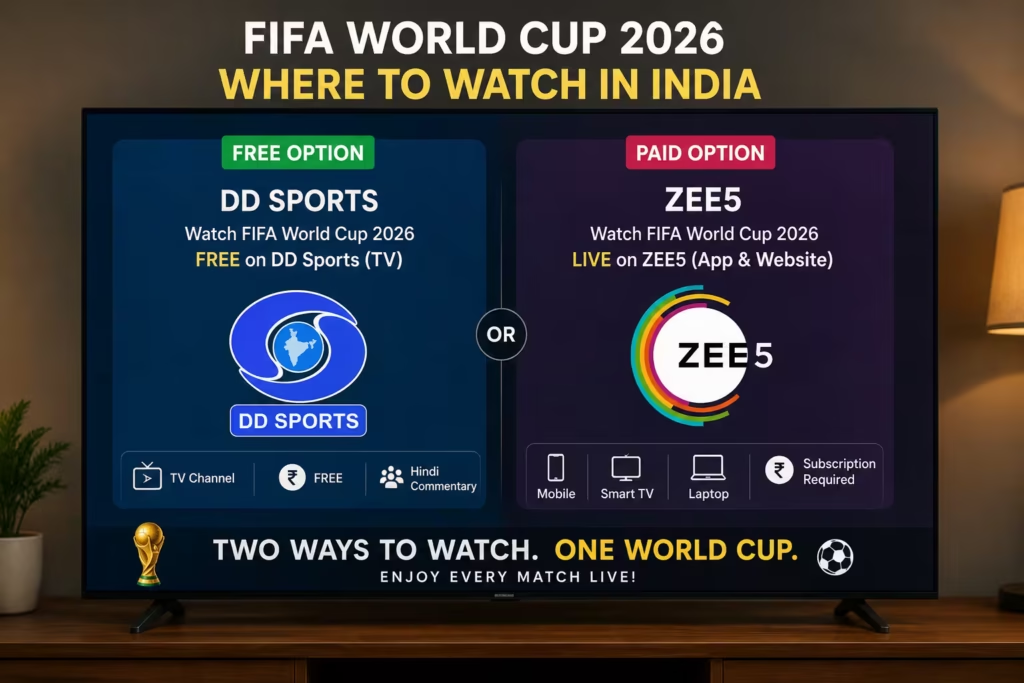
[Image: DD Sports and ZEE5 options shown on a TV screen]
Alt text: FIFA World Cup 2026 free and paid options in India
ZEE5 FIFA World Cup 2026 Plan
ZEE5 is the main streaming option for Indian users. You can use it on mobile, Smart TV, laptop or tablet.
Before buying a plan, check the FIFA World Cup section inside ZEE5. Also, check whether your current plan includes live matches. Some users may need a FIFA-specific pack.
ZEE5 is best for users who want complete coverage. However, casual viewers can check DD Sports for selected matches.
Also, avoid fake “free FIFA streaming” websites. Many such pages use pop-ups, fake play buttons and unsafe download links.
How to Watch FIFA World Cup 2026 on Mobile
Watching on mobile is simple. First, install the ZEE5 app from the Play Store or App Store. Then, log in with your mobile number or email. After that, search for FIFA World Cup 2026.
Choose the correct plan if required. Then open the live match page before kick-off.
For better streaming, use Wi-Fi. Also, charge your phone before the match starts. Live streaming can drain battery quickly. If your phone heats up, reduce brightness and remove the back cover.
If you need a phone with better battery backup for streaming, you can also read this Tech Morphix guide: https://techmorhpix.in/redmi-turbo-5-india-launch-specs-price/
For budget phone buyers, this guide may also help: https://techmorhpix.in/best-budget-phones-india-june/
How to Watch FIFA World Cup 2026 on Smart TV
Smart TV is the best option if you want a bigger screen. First, open your TV app store. Then search for ZEE5 and install the app.
After installation, log in with your account. Then open the FIFA World Cup 2026 section. Finally, choose the live match.
If the app buffers, restart your TV and router. Also, update the ZEE5 app before match time. This simple step can fix many streaming problems.
If your TV is old, you can use a Fire TV Stick, Android TV box or similar streaming device. This can make the app smoother.
For more simple tech guides, visit Tech Morphix here: https://techmorhpix.in/
How to Watch FIFA World Cup 2026 on Laptop
Laptop streaming is also easy. Open the ZEE5 website in your browser. Then log in and search for FIFA World Cup 2026.
Use an updated browser like Chrome, Edge, Safari or Firefox. Also, close extra tabs before streaming. This can improve performance.
If your Wi-Fi is weak, sit closer to the router. You can also connect your laptop to a TV using HDMI.
If you are planning to buy a laptop for study, office work and streaming, check this Tech Morphix guide: https://techmorhpix.in/best-laptop-under-50000-india/
Best Internet Speed for FIFA World Cup Streaming
A stable internet connection is very important. Football has fast movement. So, slow internet can cause buffering during important moments.
For mobile HD streaming, 5 Mbps can work. However, 10 Mbps is better. For Full HD on Smart TV, try to use 15 Mbps or higher.
If many people use the same Wi-Fi, 30 Mbps is safer. Also, reduce video quality if the stream keeps buffering.
A stable HD stream is better than a broken Full HD stream.
Avoid Fake FIFA World Cup Streaming Links
Many fake websites appear during big sports events. These websites often use titles like “Watch FIFA World Cup free live.” However, they may not be safe.
Some fake sites show pop-up ads. Others ask users to install unknown APK files. Some may even steal payment or login details.
So, use official platforms only. Use ZEE5 for streaming. Use Unite8 Sports for TV. Also, check DD Sports on DD Free Dish for selected free matches.
For privacy and safe browsing details related to Tech Morphix, you can also check our privacy page: https://techmorhpix.in/privacy-policy/
Best Way to Watch FIFA World Cup 2026 in India
The best option depends on your need.
If you want every match, use ZEE5. If you prefer TV, check Unite8 Sports or Zee sports channels. If you want selected free matches, check DD Sports on DD Free Dish.
For most users, the best setup is simple. Use ZEE5 on Smart TV with stable Wi-Fi. Also, keep the mobile app ready as a backup.
Final Verdict
Now you know how to watch FIFA World Cup 2026 in India. ZEE5 is the main online streaming option. Unite8 Sports covers TV viewers. Also, DD Sports on DD Free Dish may show selected matches for free.
If you want complete coverage, choose ZEE5. If you only want big matches, DD Sports may be enough. However, avoid fake free streaming websites.
The best setup for most Indian users is simple: ZEE5 app, stable Wi-Fi and either a Smart TV or mobile phone.
For more smartphone tips, streaming help and simple tech explainers, visit Tech Morphix: https://techmorhpix.in/
FAQs
Q. Which app streams FIFA World Cup 2026 in India?
ZEE5 is the main online streaming app for FIFA World Cup 2026 in India.
Q. Can I watch FIFA World Cup 2026 for free in India?
Yes, selected matches may be available on DD Sports through DD Free Dish.
Q. Which TV channel shows FIFA World Cup 2026 in India?
Zee/Unite8 Sports channels are the main TV options for FIFA World Cup 2026 in India.
Q. Is ZEE5 Premium enough for FIFA World Cup 2026?
Not always. Some users may need a FIFA-supported plan or upgrade. Check the FIFA section inside ZEE5 before match time.
Q. What is the best way to watch FIFA World Cup 2026 on mobile?
Install ZEE5, log in, choose the correct FIFA plan and use Wi-Fi for smooth streaming.
Q. What internet speed is good for FIFA World Cup streaming?
For mobile HD, 5–10 Mbps can work. For Full HD Smart TV streaming, 15–20 Mbps is better.
Q. Should I use free streaming websites?
No. Random free streaming websites can be unsafe. Use official apps and TV channels only.

![Is the Google Pixel 10a Worth Buying? [Price Cut]](https://techmorhpix.in/wp-content/uploads/2026/06/67157222-de41-4a2d-a0bc-9f21806e7f75-1-300x200.avif)
