
Phone snatching is one of the most common street crimes in major cities globally — and it’s particularly difficult to counter because the device is taken while already unlocked. Apple is responding with a new anti-snatch detection feature currently in development for iOS, designed to automatically lock an iPhone the moment it’s grabbed from your hand. Here’s how it works, what’s already available now, and what it means for iPhone security — especially in India.
The Problem: Why Snatch Theft Is Uniquely Dangerous
Traditional phone theft — taking a device that’s locked or switched off — is largely mitigated by lock screens and Find My. But snatch theft is different. When your phone is ripped from your hand while you’re actively using it, the thief gets a fully unlocked device with immediate access to:
- Your banking and UPI apps (PhonePe, Google Pay, Paytm)
- Your email and social media accounts
- Stored passwords via iCloud Keychain
- The ability to change your Apple Account password before you can react
- Access to Aadhaar-linked services and digital wallets
In India specifically, phone snatching has risen sharply in metro cities. According to NCRB data, mobile phone theft accounts for a significant share of street crime in Mumbai, Delhi, Bengaluru, and Hyderabad. The financial damage from a single snatch incident — when banking apps are open — can far exceed the phone’s value.
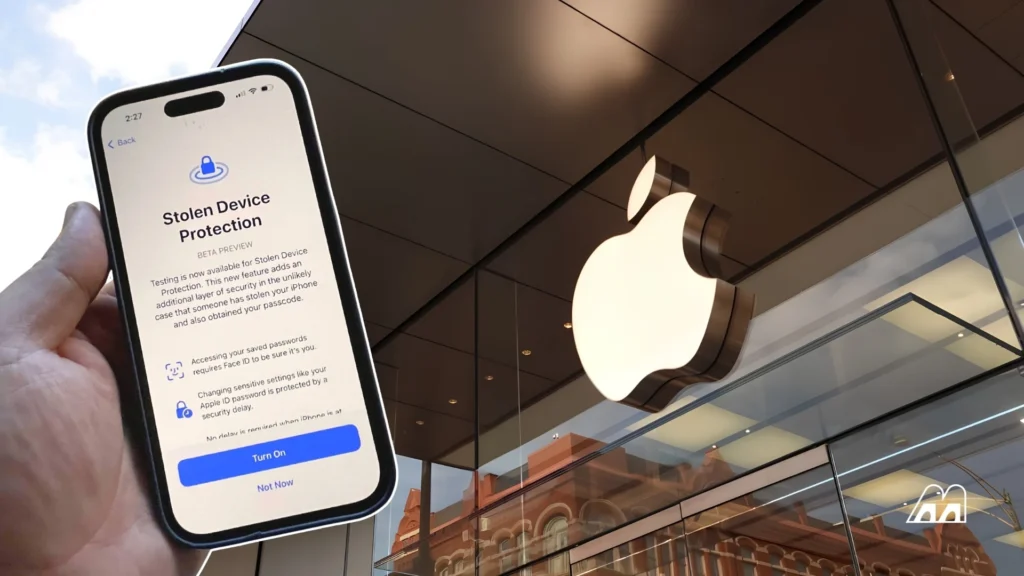
What Apple Already Has: Stolen Device Protection
Apple introduced Stolen Device Protection in iOS 17.3 — it’s now enabled by default in iOS 27. Here’s exactly what it does when active:
| Situation | What Stolen Device Protection Does |
|---|---|
| Away from trusted locations | Requires Face ID/Touch ID for sensitive actions — passcode alone is not accepted |
| Accessing saved passwords | Biometric authentication required |
| Using saved payment methods | Biometric required at point of use |
| Changing Apple Account password | 1-hour security delay + second biometric check |
| Turning off Lost Mode | Security delay enforced regardless of location |
| Disabling Find My | Security delay + biometric required |
| Disabling Stolen Device Protection itself | Biometric + 1-hour delay + second biometric |
This significantly limits what a thief can do even with an unlocked iPhone — they cannot immediately drain your bank accounts or lock you out of your Apple Account. However, Stolen Device Protection activates after the theft has occurred. The new anti-snatch feature aims to prevent the effective theft in the first place.
The New Anti-Snatch Feature: How It Works
Apple is developing a next-generation feature specifically targeting snatch theft scenarios. Based on analysis of iOS 27 beta builds as of June 2026, the system works in three stages:
Stage 1: Motion Pattern Detection
The iPhone’s accelerometer and gyroscope continuously monitor movement patterns in the background. Normal phone use — being held, carried, moved — has characteristic, predictable motion signatures. A phone being forcefully ripped from a hand produces a distinctive sudden-force acceleration pattern in a specific direction, without the preceding hand movement that normally precedes intentional phone movement.
Apple’s machine learning models, trained on thousands of motion scenarios, distinguish between genuine snatch events and benign high-acceleration events (dropping a phone, tossing it to someone, running).
Stage 2: Apple Watch Distance Verification
If the user is wearing an Apple Watch, the system simultaneously monitors the Bluetooth and Ultra Wideband (UWB) distance between the iPhone and Watch. A sudden rapid increase in that distance — beyond what natural arm movement creates — combined with the suspicious acceleration signature significantly raises the confidence that a snatch event has occurred.
This two-factor confirmation (motion + distance) dramatically reduces false positives. The Watch is an optional component — the feature can operate on accelerometer data alone, with wider calibration thresholds to compensate.
Stage 3: Instant Lock Response
When both signals confirm a probable snatch event within the detection window (estimated at under 500 milliseconds), the iPhone immediately:
- Locks the screen completely (requiring Face ID or passcode)
- Activates all Stolen Device Protection restrictions
- Optionally triggers an audible alarm
- Sends a real-time location ping to the owner’s other Apple devices
- Logs the GPS coordinates at the moment of suspected theft
Current Status: Development Stage, Not Released
As of June 2026, this feature is in active development. Apple has not made any public announcement. Details come from iOS 27 beta code analysis by security researchers. There is no confirmed release timeline — it may ship in a later iOS 27 update (27.1 or 27.2) or in iOS 28.
The primary engineering challenge is calibration: avoiding false positives in everyday scenarios like jogging with your phone, handing it to someone quickly, or children playing with it. Apple’s historical approach is to over-refine before shipping — expect a cautious rollout with sensitivity controls in Settings.
How to Enable Stolen Device Protection Now (iOS 27)
Don’t wait for the anti-snatch feature — enable Stolen Device Protection today. Here’s how:
- Open Settings on your iPhone
- Tap Face ID & Passcode (or Touch ID & Passcode on older models)
- Enter your passcode when prompted
- Scroll down to Stolen Device Protection
- Tap Turn On Protection if not already enabled
- Choose “Always” for maximum protection at all locations (not just away from home)
For additional security, also enable Lockdown Mode when travelling in high-risk areas — though this significantly restricts app functionality and is intended for high-risk situations only. See Apple’s official iOS security documentation for the complete feature list. For a broader comparison of phone security features, read our iOS 27 full feature breakdown.
Android’s Equivalent: Theft Detection Lock
Google introduced Theft Detection Lock in Android 10 and significantly expanded it in Android 17. The Android version uses on-device AI to detect motion patterns consistent with theft and automatically locks the device. Key differences from Apple’s approach:
- Google’s system: Primarily accelerometer-based, no secondary sensor confirmation required
- Apple’s system: Dual-factor (motion + Apple Watch distance) for higher accuracy
- Samsung One UI 9: Adds additional anti-theft layers including SIM change detection and remote wipe via Samsung Find
Both ecosystems are converging on similar anti-theft capabilities. For Indian users deciding between platforms, our iPhone vs Samsung comparison covers security features in depth.
What It Means for iPhone Users in India
Phone snatching is particularly prevalent in Indian metro cities — crowded markets, auto-rickshaw rides, and busy pavements are common theft scenarios. The current Stolen Device Protection already significantly reduces the financial damage from a snatch incident. The new anti-snatch feature would make the theft itself ineffective — turning the phone into a locked, useless device within milliseconds of leaving your hand.
For iPhone users in India right now:
- Enable Stolen Device Protection immediately (Settings → Face ID & Passcode)
- Set it to “Always” rather than only away from trusted locations
- Enable Find My with “Send Last Location” turned on
- Consider adding a trusted emergency contact in your Medical ID for quick police reporting
Frequently Asked Questions
Will the anti-snatch feature work without an Apple Watch?
Yes, but with reduced accuracy. The Apple Watch provides UWB distance confirmation that significantly reduces false positives. Without a Watch, the system relies solely on accelerometer data and may have wider sensitivity thresholds, meaning slightly more false triggers in some edge cases like jogging or sudden arm movements.
Can a thief disable Stolen Device Protection before taking the phone?
No — disabling Stolen Device Protection requires Face ID authentication and, when away from a trusted location, a mandatory one-hour security delay followed by a second biometric check. This makes it impossible for a thief to pre-disable the protection immediately before stealing the phone.
Does this protect against pickpocketing?
The anti-snatch feature specifically targets violent, rapid-force theft. A slow pickpocket would not trigger the same acceleration signature that the feature detects. However, Stolen Device Protection applies to both scenarios once the phone is locked — the thief still cannot access sensitive apps or change your Apple Account without biometric authentication.
Is there an Android equivalent of Stolen Device Protection?
Yes — Android 10+ introduced Theft Detection Lock using Google’s on-device AI to detect theft motion patterns. Android 17 expands this with improved detection and offline lock capability. Samsung One UI 9 adds additional anti-theft features including SIM-change alerts and enhanced remote wipe options in the Security section of Settings.
When will the anti-snatch feature officially release?
No official release date has been confirmed by Apple. Based on the development stage observed in iOS 27 beta builds, the most likely release windows are iOS 27.1 (expected late 2026) or iOS 28 in 2027. Apple typically does not announce security features until they are release-ready. We will update this article when an official announcement is made.

2 Thoughts on this Article