⚡ At a Glance: Quick Takeaways
- Best Budget Gaming Laptop (< ₹70,000): Lenovo LOQ 15 (High TGP & esports performance)
- Best Mid-Range Value (₹75,000 – ₹95,000): HP Victus 15 (Smooth 1080p AAA gaming)
- Best Upper Mid-Range (₹1.4L – ₹1.8L): ASUS ROG Strix G16 (QHD 165Hz display & robust cooling)
- Best Premium Slim Laptop (₹2.1L – ₹2.3L): Acer Predator Helios Neo 16S AI (WQXGA OLED screen)
- Best Flagship Desktop Replacement (₹2.4L+): Lenovo Legion Pro 7i (Unrestricted TGP thermal design)
Finding the best gaming laptops in India in 2026 requires looking beyond flash marketing and confusing spec lists. Major laptop brands frequently highlight GPU names without mentioning Total Graphics Power (TGP) or thermal throttling limitations. As a result, two laptops with identical graphic cards can yield drastically different frame rates in modern titles.
Whether you play fast-paced esports games like Valorant and BGMI or demanding 4K AAA titles like Cyberpunk 2077, picking the right balance of cooling, display quality, and GPU wattage is essential. In this guide, we review the top 5 gaming laptops available in India across every budget bracket to help you make an informed decision.
For gamers interested in bleeding-edge desktop-class performance, check out our in-depth analysis on Why Alienware RTX 50 Laptops Are Leading in India.

Quick Comparison Table: Best Gaming Laptops in India (2026)
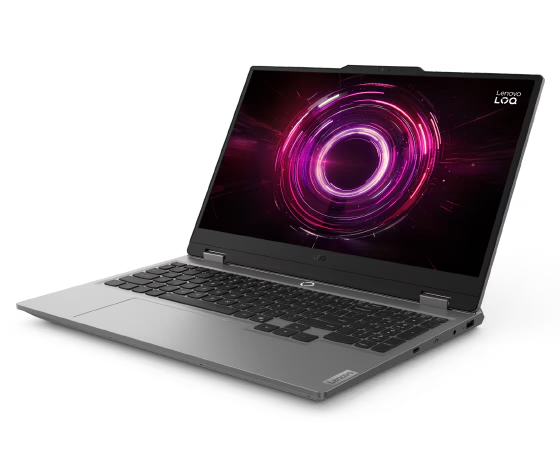
1. Lenovo LOQ 15 — Best Budget Gaming Laptop Under ₹70,000
If your budget tops out around ₹70,000, the Lenovo LOQ 15 is currently the benchmark for entry-level gaming in India. Unlike competing budget models that heavily throttle graphics wattage, Lenovo supplies up to 95W TGP to its discrete GPU, ensuring maximum graphics throughput.
- Processor: Intel Core i5 (12th/13th Gen) or AMD Ryzen 5 7000 Series
- Graphics: NVIDIA GeForce RTX 3050 / RTX 4050 (Up to 95W TGP)
- Display: 15.6-inch Full HD (1920 × 1080), 144Hz Refresh Rate, 100% sRGB
- Memory & Storage: 16GB DDR5 RAM + 512GB PCIe Gen4 NVMe SSD
- Cooling: Dual-fan cooling system with rear heat exhaust vents
In real-world testing, competitive titles like Valorant comfortably hit over 200 FPS on ultra settings, while BGMI emulator sessions maintain stable 60–90 FPS profiles. Heat management remains effective during multi-hour sessions thanks to Lenovo’s rear-mounted exhaust vents.
Pros:
- Full TGP wattage allocation yields superior frame rates over rivals.
- Color-accurate 100% sRGB display option available in this tier.
- Sturdy chassis construction with dual M.2 SSD upgrade slots.
Cons:
- Battery runtime sits around 3 hours under normal web tasks.
- Power brick is relatively bulky to carry in a backpack.
Verdict: The Lenovo LOQ 15 is the top choice for students and first-time gamers seeking maximum FPS per rupee under ₹70,000.
2. HP Victus 15 — Best Value Mid-Range Gaming Laptop (₹75,000 – ₹95,000)
For gamers wanting smooth 1080p performance across demanding modern AAA titles, the HP Victus 15 offers an ideal middle ground. HP has refined the Victus line to deliver subtle aesthetic styling alongside high gaming performance.
- Processor: AMD Ryzen 7 7840HS or Intel Core i5 (13th Gen)
- Graphics: NVIDIA GeForce RTX 4050 / RTX 5050 (Up to 75W TGP)
- Display: 15.6-inch Full HD (1920 × 1080) IPS Display, 144Hz Refresh Rate
- Memory & Storage: 16GB DDR5 5600MHz RAM + 1TB PCIe Gen4 NVMe SSD
- Weight: 2.29 kg
Equipped with DLSS 3 frame generation technology, the Victus 15 handles modern games like Forza Horizon 5 and Shadow of the Tomb Raider smoothly above 75 FPS on high settings. Furthermore, its clean matte design allows it to pass as a professional laptop in office or classroom environments.
If you are also exploring smartphone gear in this price segment, see our guide on the Best Budget Tech Gadgets in India.
Pros:
- Understated design suitable for both work and gaming.
- Generous 1TB NVMe storage default configuration.
- Quiet fan profiles during lightweight office software usage.
Cons:
- Display color coverage is standard 62.5% sRGB.
- Display hinge exhibits slight wobble when typing aggressively.
Verdict: An excellent all-rounder for users who need a dual-purpose laptop for college lectures, office work, and weekend gaming.
3. ASUS ROG Strix G16 — Best Upper Mid-Range Performance Pick (₹1.4L – ₹1.8L)
When jumping to the ₹1.5 Lakh tier, expectations rise significantly regarding build quality, display response times, and thermal cooling. The ASUS ROG Strix G16 excels across every performance metric, making it one of the most reliable laptops in India for serious gamers.
- Processor: Intel Core i7-13650HX or Intel Core i9-14900HX
- Graphics: NVIDIA GeForce RTX 4060 / RTX 5060 (Up to 140W Max TGP)
- Display: 16-inch QHD+ (2560 × 1600) ROG Nebula Display, 165Hz / 240Hz Refresh Rate
- Memory & Storage: 16GB or 32GB DDR5 4800MHz RAM + 1TB PCIe Gen4 NVMe SSD
- Cooling Technology: Tri-Fan Cooling System with Conductonaut Extreme Liquid Metal
ASUS incorporates liquid metal thermal compound on the CPU alongside a full-width heatsink tri-fan cooling system. This enables the GPU to operate at its maximum 140W TGP thermal limit without triggering thermal throttling. The 16-inch QHD+ ROG Nebula panel delivers vibrant colors with 100% DCI-P3 coverage, ideal for video editors and competitive players alike.
Pros:
- Exceptional thermal management with Conductonaut liquid metal.
- Gorgeous 16-inch QHD+ ROG Nebula display with fast response times.
- Per-key RGB keyboard with tactile key travel.
Cons:
- No built-in webcam shutter or biometric fingerprint scanner.
- Heavy 2.5 kg chassis weight.
Verdict: The definitive choice for gamers and creators seeking high frame rates, 1440p gaming resolution, and top-tier thermal cooling reliability.

4. Acer Predator Helios Neo 16S AI — Best Premium Slim OLED Laptop (₹2.1L – ₹2.3L)
Historically, high-performance gaming laptops were bulky, heavy machines. The Acer Predator Helios Neo 16S AI challenges this norm by delivering top-tier performance inside a sleek aluminum chassis under 19mm thick.
- Processor: Intel Core Ultra 9 185H / Intel Core Ultra Series 2
- Graphics: NVIDIA GeForce RTX 4070 / RTX 5070 (Up to 140W TGP)
- Display: 16-inch WQXGA (2560 × 1600) OLED Display, 240Hz Refresh Rate, 0.2ms Response Time
- Memory & Storage: 32GB LPDDR5X RAM + 2TB PCIe Gen4 NVMe SSD
- Design: Ultra-slim 18.9mm chassis with a lightweight 2.1kg build
The standout highlight of the Helios Neo 16S AI is its stunning 240Hz WQXGA OLED panel. With infinite contrast ratios, deep blacks, and sub-1ms response times, game visuals look breathtakingly vivid. Additionally, the dedicated NPU in the Intel Core Ultra processor efficiently handles background AI workloads such as noise removal and stream encoding.
Pros:
- Spectacular WQXGA OLED display with 100% DCI-P3 color gamut.
- Slim, durable all-metal chassis ideal for travel and portability.
- Massive 2TB PCIe Gen4 SSD storage included out of the box.
Cons:
- RAM is soldered and non-upgradeable due to the thin chassis design.
- Higher price tag compared to standard IPS alternatives.
Verdict: Perfect for traveling professionals, streamers, and enthusiasts who demand an OLED screen without carrying a heavy laptop bag.
5. Lenovo Legion Pro 7i — Best Flagship Desktop Replacement (₹2.4 Lakh+)
For users who want zero compromises, the Lenovo Legion Pro 7i represents the pinnacle of mobile gaming engineering in India. Designed to deliver desktop-class performance, this flagship machine pushes thermal limits to the maximum.
- Processor: Intel Core Ultra 9 HX Series (Up to Core Ultra 9 14900HX)
- Graphics: NVIDIA GeForce RTX 4090 / RTX 5090 (Up to 175W+ Max TGP)
- Display: 16-inch WQXGA Display, 240Hz Refresh Rate, 500 nits Brightness, VESA DisplayHDR™ True Black 1000
- Memory & Storage: 32GB or 64GB DDR5 5600MHz RAM + 2TB PCIe Gen4 NVMe SSD
- Cooling Technology: Lenovo Coldfront Vapor Chamber Cooling with Hyper Chamber Airflow
Equipped with Lenovo’s Coldfront Vapor Chamber technology, the Legion Pro 7i can sustain over 275W of total combined system power in Performance Mode. Consequently, demanding titles run effortlessly at native 1600p resolution with ray tracing and ultra settings maxed out.
Pros:
- Unrivaled gaming performance capable of maxing out any title.
- Coldfront Vapor Chamber maintains low surface temperatures.
- Top-tier build quality, keyboard feel, and port selection.
Cons:
- Premium price point starting above ₹2.4 Lakh.
- Short battery life when unplugged from wall power.
Verdict: The ultimate flagship choice for competitive esports pros, 4K video editors, and gamers who demand maximum desktop replacement power.
Buying Guide: How to Choose the Best Gaming Laptop in 2026
Before making your final purchase, evaluate these critical hardware specifications to ensure your laptop remains fast and future-proof for years to come:
1. Total Graphics Power (TGP) vs. VRAM
Do not judge a laptop GPU solely by its model name or VRAM size. A 140W TGP RTX 4060 will consistently outperform a low-wattage 75W TGP RTX 4070 due to higher power headroom. Always check the manufacturer’s TGP rating before buying.
2. Display Refresh Rate & Color Accuracy
For competitive multiplayer games (Valorant, CS2, Overwatch 2), prioritize high refresh rates (144Hz or 240Hz) and low response times. If you edit photos or videos, select panels with 100% sRGB or 100% DCI-P3 color accuracy to avoid washed-out colors.
3. RAM & Storage Upgradeability
Modern games like Call of Duty: Warzone and Hogwarts Legacy often require over 100GB of storage and benefit from 16GB to 32GB of fast DDR5 RAM. Ensure your chosen laptop features accessible M.2 SSD and SO-DIMM RAM slots for future expansion.
Frequently Asked Questions (FAQ)
Q1: Which is the best gaming laptop under ₹1 Lakh in India?
The HP Victus 15 and higher-tier Lenovo LOQ 15 models offer the best performance under ₹1 Lakh, delivering smooth 1080p frame rates in modern games.
Q2: Is TGP more important than GPU VRAM for gaming laptops?
Yes. Higher TGP (Total Graphics Power) allows the graphics chip to boost higher and maintain peak clock speeds longer, yielding higher overall frame rates than lower-wattage cards.
Q3: How much RAM do I need for gaming in 2026?
16GB DDR5 RAM is the standard baseline for modern gaming in 2026. However, upgrading to 32GB is recommended if you stream, render 4K video, or run heavy background applications while playing.
Q4: Are gaming laptops suitable for video editing and content creation?
Absolutely. The high-performance CPUs, powerful dedicated GPUs, and fast NVMe storage in gaming laptops make them exceptional for rendering video in Adobe Premiere Pro, DaVinci Resolve, and Blender.
Final Conclusion
Selecting the best gaming laptop in India comes down to aligning your target budget with your preferred games. If you are on a tight budget under ₹70,000, the Lenovo LOQ 15 provides unbeatable FPS per rupee. For mid-range 1080p gaming, the HP Victus 15 strikes the perfect balance. Meanwhile, enthusiasts wanting high refresh 1440p gaming or OLED visuals should consider the ASUS ROG Strix G16 or Acer Predator Helios Neo 16S AI.
Ready to upgrade your gear? Compare live retailer discounts on official store pages and check warranty options before completing your order!