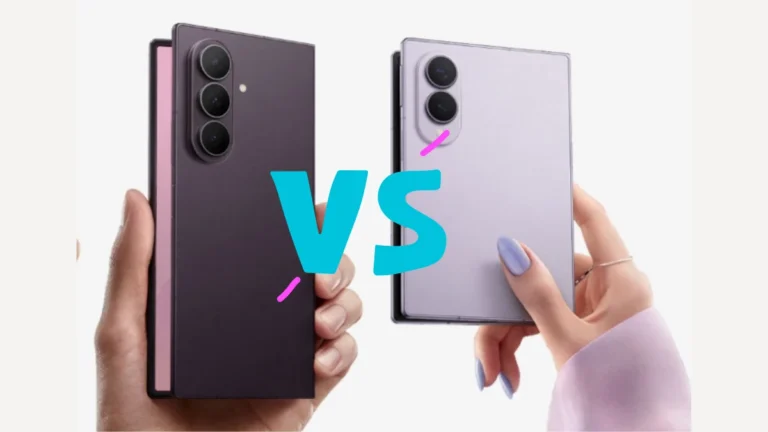
Galaxy Z Fold 8 Review: Everything You Need to Know
The new Samsung Galaxy Z Fold 8, Fold 8 Ultra, and Flip 8 are finally here. Discover specifications, battery life, cameras, and incredible prices.
Samsung Galaxy F06 5G Review: Does this budget 5G phone justify the Samsung badge under ₹10,000? We test the performance, display, battery, and value.
If your Galaxy S26 fingerprint sensor has suddenly started asking you to “try again” more than once, you’re not imagining it — and you’re definitely not alone. It’s one of the most searched Samsung problems right now, and the good news is Samsung actually built a fix for it. With One UI 8.5, every Galaxy S26 series device ships with a hidden-in-plain-sight setting called Improve Accuracy, and it can noticeably boost how reliably your phone reads your finger. In this guide, we’ll walk through exactly how to improve fingerprint accuracy in the Galaxy S26, Galaxy S26+, and Galaxy S26 Ultra, why the issue happens in the first place, and what to do if the built-in fix still isn’t enough. Why Does the Galaxy S26 Fingerprint Sensor Miss Sometimes? The Galaxy S26 series uses the same ultrasonic in-display fingerprint hardware found on the Galaxy S25 and Galaxy S24, so the sensor itself hasn’t changed. What has changed is how much data the software collects about your fingerprint pattern. A few everyday things can throw the sensor off: Screen protectors, especially thicker tempered-glass ones, can shift the recognition zone by even a fraction of a millimeter. Dry or slightly damp fingers scatter the ultrasonic signal the sensor relies on. Small cuts, calluses, or pressure changes on the finger you registered can make the stored print less accurate over time. Registering a print too quickly during initial setup means the phone captured fewer angles of your finger than it ideally needs. Samsung’s Improve Accuracy feature exists specifically to correct these gaps without forcing you to delete your fingerprint and start over. How to Improve Fingerprint Accuracy in Galaxy S26 Series (Step-by-Step) Here’s the exact path to the setting on every Galaxy S26 model: Open the Settings app and go to Security and privacy. Tap Screen lock and biometrics, then select Fingerprints. Enter your current PIN, password, or pattern to confirm it’s you. Tap on your registered fingerprint (usually labeled “Fingerprint 1”). Select Improve accuracy from the menu. Scan the same finger you originally registered — you’ll need to do this 10 times, covering different edges and angles of your fingertip with each scan. Once the counter finishes, back out and try unlocking your phone normally. That’s it. The whole process takes under two minutes, and there’s a Knox-secured badge on the screen confirming the extra scan data stays encrypted on-device, the same way your original fingerprint does. Quick Tip If you unlock with more than one finger, repeat the Improve Accuracy steps separately for each registered print — the boost only applies to the finger you actually rescan. More Ways to Fix Fingerprint Recognition Issues on Galaxy S26 If Improve Accuracy alone doesn’t solve it, try these before assuming it’s a hardware fault: Use a Samsung-certified screen protector. Off-brand tempered glass is one of the most common causes of fingerprint misreads, particularly on the S26 Ultra. Clean the screen and your finger. Sweat, lotion, or a smudged display can block the ultrasonic reading even after Improve Accuracy. Add a duplicate scan of the same finger. You can register the same finger twice under two separate slots — it sounds redundant, but it gives the sensor a second data set to cross-check against. Update to the latest One UI 8.5 build. Samsung has continued shipping small biometric refinements in maintenance updates since launch. Restart the device. A simple reboot occasionally clears a temporary sensor calibration glitch. Re-register from scratch as a last resort. Delete the fingerprint entirely and set it up again slowly, holding your finger flat and covering the whole sensor area on each scan. If your Galaxy S26 Ultra is still struggling after all of this, it’s worth booking a Samsung Care+ diagnostic, since a small number of early units have had genuine sensor-alignment issues under the display. Related Reads While you’re getting your Galaxy S26 running perfectly, these guides from our How-To Guides section might help too: Rocking a foldable instead? Check out what’s coming with the Samsung Galaxy Z Fold 8 leaks. Shopping around the Samsung lineup? Our Samsung M47 buying guide breaks down pricing worldwide. Not sure which Samsung phone fits your budget? See our full Best Samsung 5G Phones guide for 2026. Running a different Android flagship? Here’s everything in the Android 17 update rollout. Frequently Asked Questions Does the Galaxy S26 have a new fingerprint sensor? No. The Galaxy S26, S26+, and S26 Ultra use the same ultrasonic in-display fingerprint hardware as the Galaxy S25 and S24. The improvement comes from software — specifically the new Improve Accuracy tool in One UI 8.5. Where is the Improve Accuracy setting on the Galaxy S26? Go to Settings > Security and privacy > Screen lock and biometrics > Fingerprints, tap your registered fingerprint, then choose Improve Accuracy. Will Improve Accuracy come to the Galaxy S25 or S24? Since it’s a One UI 8.5 software feature and not tied to new hardware, it’s expected to roll out to older Galaxy devices that receive the same update, though Samsung hasn’t confirmed an exact timeline. Why does my Galaxy S26 fingerprint stop working after adding a screen protector? Thicker or misaligned screen protectors can shift the sensor’s recognition area just enough to cause repeated misreads. Using Improve Accuracy after installing a protector, along with a Samsung-certified protector, usually resolves it. How many times should I scan my finger to fix the sensor? The Improve Accuracy tool requires exactly 10 scans of your already-registered finger, angled slightly differently each time, to build a more complete fingerprint profile. Final Thoughts Samsung’s Improve Accuracy feature is a small addition, but it solves a genuinely long-standing complaint about Galaxy phones’ fingerprint reliability. If your Galaxy S26 series device has been giving you trouble, it’s worth two minutes of your time before you consider switching to face unlock or a PIN full-time. For persistent issues, Samsung’s own fingerprint troubleshooting page has additional device-specific steps, and outlets like Android Authority have documented the same fix across multiple Galaxy S26 units.
Get the first look at the Samsung Galaxy Z Fold 8 leaks. We cover the new ‘Wide’ model, Ultra specs, release date, and price. Find out what’s new for 2026.
Read our expert best phones under 15000 review. We analyze the design, performance, battery life, and expected India price to see if it is worth bu…
Get the latest leaks, specs, and details on under. We cover the expected release date, design updates, and India pricing information.